Enrichment Onboarding
Step-by-step guide to onboarding a new customer to Attribute Enrichment
This guide walks through onboarding a new tenant to the Attribute Enrichment pipeline — from selecting the right product types to running the first enrichment and validating results.
This guide covers local setup. All steps run pipeline components directly from the command line, which is the fastest way to validate a new tenant and tune configurations. Once you've achieved a first successful enrichment and are happy with the quality, the full Cloud Workflows automation can be set up to run the pipeline daily without manual intervention — see the Data Enrichment Flow for the production architecture.
Pipeline overview
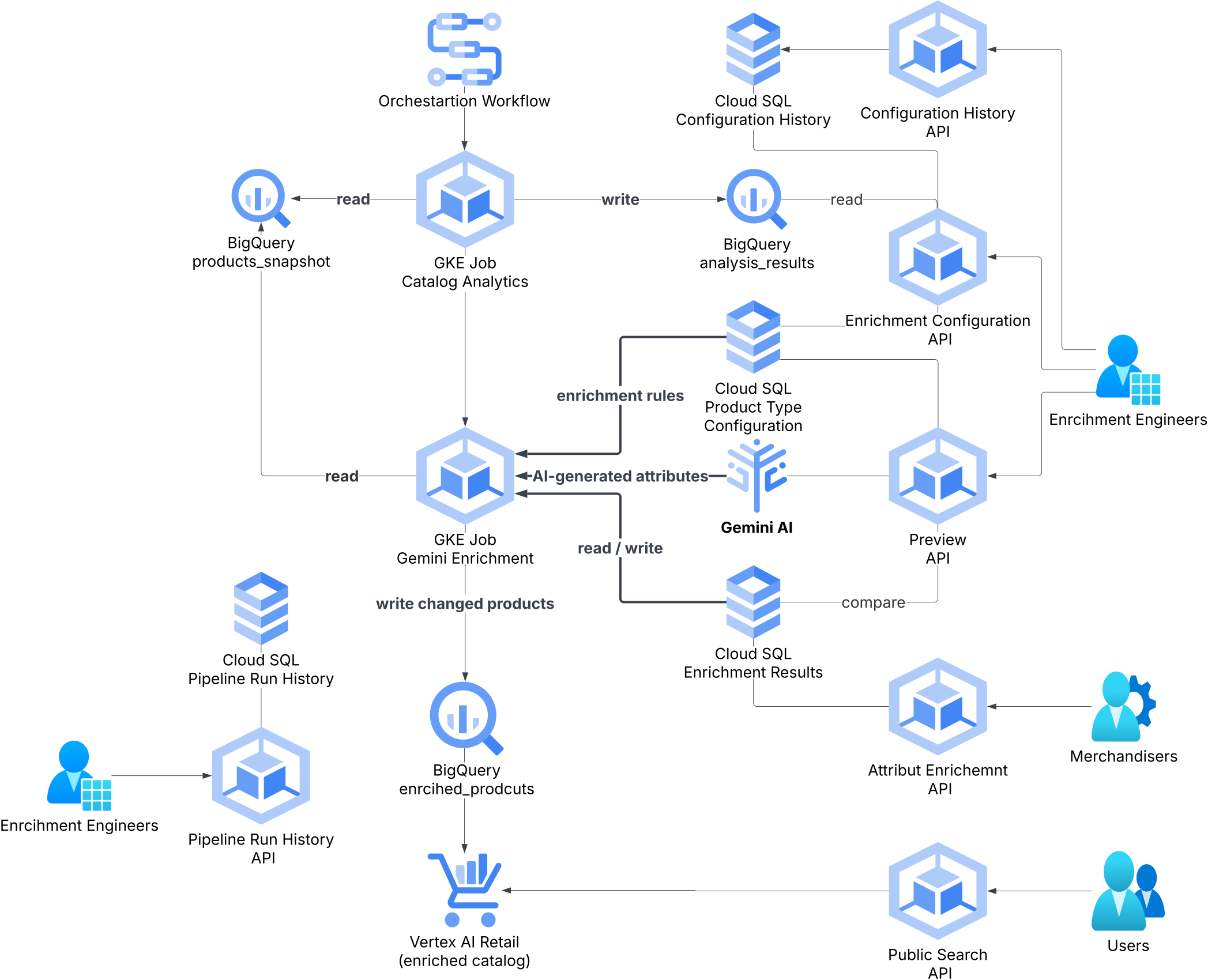
The pipeline runs as a sequence of GKE jobs orchestrated by Google Cloud Workflows. Each tenant has an isolated instance triggered daily by Cloud Scheduler.
Environment setup
This guide uses two repositories:
| Repo | Purpose |
|---|---|
cto-rnd-magellan-catalog-enrichment | Python pipeline — Snapshot Exporter, Catalog Analytics, Gemini Enrichment Processor |
cto-rnd-magellan-core | Java service — CatalogEnrichment module, REST API for attribute configuration and UI |
All pipeline components are run from the project root of cto-rnd-magellan-catalog-enrichment with the Python virtual environment activated. Set up once before starting the steps:
python3.12 -m venv app/venv
source app/venv/bin/activate
pip install -r app/requirements.txt

gcloud auth login
gcloud auth application-default login
Copy the example env file and fill in your values — all scripts load from it automatically:
cp app/.env.example app/.envKey variables to set:
| Variable | Description |
|---|---|
GCP_PROJECT_ID | GCP project ID |
TENANT_NAME | Tenant name (e.g. macys) |
RETAIL_CATALOG_ID | Vertex AI Retail catalog ID (usually default_catalog) |
GCS_CONFIG_BUCKET | GCS bucket containing the tenant config JSON |
GCS_CONFIG_FILE_PATH | Path to config within bucket (e.g. macys/catalog_enrichment_config.json) |
BIGQUERY_DATASET_ID | BigQuery dataset (default: mxp_catalog_enrichment) |
GEMINI_API_KEY | Gemini API key for enrichment calls |
CLOUD_SQL_CONNECTION_NAME | Cloud SQL connection string (project:region:instance) |
CLOUD_SQL_DATABASE | Database name (usually magellan) |
CLOUD_SQL_USER | Database user |
CLOUD_SQL_PASSWORD | Database password |
Steps
Export the product snapshot
Before you can pick product types, you need a snapshot of the tenant's catalog in BigQuery. If one doesn't already exist, run the Snapshot Exporter from the project root with the virtual environment activated:
python3 app/src/snapshot_product_data_exporter.py \
  --tenant <tenant> \
  --date $(date +%Y-%m-%d)
This writes all products from Vertex AI Retail into a BigQuery table named <tenant>_products_snapshot_YYYY_MM_DD (hyphens in the --date argument are converted to underscores in the table name). Verify the table exists in BigQuery before proceeding.
Once the snapshot is ready, identify product types with 100–500 products — enough for analytics fill-rate data to be meaningful, small enough to iterate quickly.
WITH unnested AS (
  SELECT *, cat AS primary_category,
    MAX(ARRAY_LENGTH(SPLIT(cat, ' > '))) OVER (PARTITION BY id) AS max_depth,
    ARRAY_LENGTH(SPLIT(cat, ' > ')) AS cat_depth
  FROM `<project>.mxp_catalog_enrichment.<tenant>_products_snapshot_<YYYY_MM_DD>`,
  UNNEST(categories) AS cat
),
base AS (
  SELECT * FROM unnested WHERE cat_depth = max_depth
  QUALIFY ROW_NUMBER() OVER (PARTITION BY id ORDER BY primary_category) = 1
)
SELECT
  primary_category,
  COUNT(*) AS product_count
FROM base
GROUP BY 1
HAVING product_count BETWEEN 100 AND 500
ORDER BY product_count DESC
Pick 2–3 product types so that their combined product count lands in the 1,000–2,000 range for the first enrichment run. That volume is large enough to see a meaningful HIGH/MEDIUM/LOW confidence distribution and tune the threshold, but small enough to review results manually and iterate quickly.
Export a filtered snapshot and prepare the tenant config
Re-run the Snapshot Exporter filtered to the product types you selected in Step 1. Pass the category names as a pipe-separated list via --categories:
python3 app/src/snapshot_product_data_exporter.py \
  --tenant <tenant> \
  --date $(date +%Y-%m-%d) \
  --categories "Category A|Category B|Category C"
This overwrites (or creates) a snapshot table containing only the selected product types — the 1,000–2,000 products you'll enrich in this run.
Then create two config files in the tenant's GCS bucket (gs://<CE_TENANT_BUCKET>/<tenant>/).
catalog_enrichment_config.json — pipeline configuration:
{
  "latestSnapshotTable": "<project>.mxp_catalog_enrichment.<tenant>_products_snapshot_<YYYY_MM_DD>",
  "analyticsTable": "<project>.mxp_catalog_enrichment.<tenant>_analysis_results",
  "sqlEnrichmentTableName": "<tenant>_enrichment_results",
  "sqlPromptConfigurationsTable": "<tenant>_prompt_configurations",
  "productSummaryViewName": "<tenant>_enrichment_results_product_summary",
  "enrichConfidenceThresholdLevel": "HIGH",
  "modelParams": {
    "model": "gemini-2.5-flash",
    "temperature": 0.5,
    "maxTokens": 65000
  },
  "confidenceCalculation": {
    "model": "gemini-2.5-flash",
    "temperature": 0.3,
    "maxTokens": 65000
  }
}
features-config.json — enables the Attribute Enrichment UI for this tenant:
{
  "tenantName": "<tenant>",
  "featureFlags": [
    {
      "name": "CATALOG_ENRICHMENT",
      "enabled": true,
      "featureUrl": ""
    }
  ]
}
Run Catalog Analytics
Catalog Analytics scans the snapshot and produces attribute coverage statistics — fill rates, missing value counts, and top-N values per attribute. These feed directly into config generation in the next step.
BQ_TABLE_NAME_TO_ANALYZE=<project>.mxp_catalog_enrichment.<tenant>_products_snapshot_<YYYY_MM_DD> \
BQ_ANALYTICS_OUTPUT_TABLE=<project>.mxp_catalog_enrichment.<tenant>_analysis_results \
python3 app/src/catalog_analytics.py
Review the output analytics table. Focus on attributes with fill rate below 60% — these are the best candidates for enrichment.
The analytics table is also used by the config generator in the next step to produce smarter prompts. Running analytics first produces better auto-generated configs.
Generate attribute configurations
Use the Generate more from AI endpoint to auto-generate enrichment configurations for each product type. The system analyzes the catalog statistics from the analytics table and proposes the most relevant attributes to enrich.
Via the API:
curl -X POST http://<ce-service>/api/v1/enrichment-attributes/<tenant>/generate-config \
  -H "Content-Type: application/json" \
  -d '{ "productType": "Backpacks" }'
Or use the Attribute Enrichment UI → select the product type → click Generate more from AI.
Review the generated configurations before enabling them:
- Check that attribute paths map to real fields in the catalog
- Adjust the validation rules for any domain-specific constraints
- Enable/disable individual attributes as needed
Repeat for each product type identified in Step 1.
Run the enrichment
Trigger the Gemini Enrichment Processor against the filtered snapshot. All base env vars come from .env — only SNAPSHOT_TABLE_NAME needs to be overridden to point at the table from Step 2:
SNAPSHOT_TABLE_NAME=<project>.mxp_catalog_enrichment.<tenant>_products_snapshot_<YYYY_MM_DD> \
python3 app/src/gemini_enrichment_processor.py
The processor reads remaining config (GCP_PROJECT_ID, TENANT_NAME, GEMINI_API_KEY, GCS_CONFIG_BUCKET, GCS_CONFIG_FILE_PATH, Cloud SQL vars) from .env. It runs in parallel batches of 10 products. Monitor the updates table in BigQuery — only products with changed attributes are written.
After the run completes, validate results in the Attribute Enrichment UI:
- Filter by Status: Published to see auto-applied values
- Filter by Confidence: Medium/Low to review values that need attention
- Spot-check 10–20 products per type for quality
If results look good, trigger the Product Importer to push enriched attributes back to Vertex AI Retail:
gcloud workflows execute <tenant>-catalog-enrichment-workflow \
  --location=us-central1