IQ Score
Measure search relevance offline with an LLM judge — a repeatable 0–100 score, ranking metrics, and a graded, explained verdict for every result
What it solves
Every search team gets asked the same question: is search good, and is it getting better? Usually the answer is an opinion. Someone types a few queries, a merchandiser flags a bad result, and an engineer argues the change was an improvement. Manual relevance annotation is the textbook fix, but it is slow, expensive and inconsistent between raters, so it gets done once and then goes stale. Online A/B tests give an honest answer, but they need weeks of traffic and a finished change before they can say anything.
IQ Score turns relevance into a number you can track. It sends a set of real queries to your search service, grades every product that comes back using an LLM agent as the judge, and computes standard ranking metrics from those grades — including a single 0–100 Search Quality Score (SQS). Every grade comes with the judge's reasoning and a named failure reason, so a low score points at what to fix rather than just reporting that something is wrong.
Evaluation runs offline. The LLM is never in the search serving path, so IQ Score adds no latency to shopper traffic. It works with any search engine: IQ Score only needs to call the search a shopper uses and read the products that come back.
When to use it
- Benchmarking search as it is today — score thousands of real queries against your live search service to get a baseline before any tuning starts.
- Catching regressions — re-run the same query set after a code change, a configuration change or a catalog upload, and see whether relevance moved.
- Comparing two configurations or engines — score the same queries against your current search and a candidate one before committing to a migration.
- Tracking quality over time — schedule a nightly or weekly baseline over a fixed query set and watch the trend.
- Pre-checking a change before an A/B test — use IQ Score to filter out changes that make relevance worse, and spend live traffic only on the promising ones in Experiment Metrics.
Key concepts
Run — one evaluation. A run takes a query set, asks the search service what it returns for each query, grades the first result page, and stores the metrics, the per-query results and every individual grade. Runs record the queries, model and configuration they used, so two runs over the same queries are directly comparable.
Query set — the queries a run evaluates. It can be sampled from real traffic (for example the top 5,000 queries from clickstream, split into head, torso and tail), copied from an earlier run, or a hand-curated benchmark list. Each query carries its traffic weight, so high-volume queries can count for more in the headline score.
Search service — the endpoint that actually answers shoppers, including merchandising rules, boosts and query understanding. IQ Score evaluates what shoppers really see, not the bare engine underneath. Any search engine can be evaluated: a new search API is onboarded by mapping its response fields in configuration, with no code, and a public storefront search page can be benchmarked even without API access.
Judgement agent — the LLM judge (Gemini by default). It is an agent rather than a single prompt: before grading, it can query the product catalog to check whether a better product exists, look up product data, and search the web for knowledge the catalog does not carry. If it finds a better product than the one returned, it lowers the grade of what was returned. IQ Score supports a different grading rubric for each domain — what counts as an exact match for auto parts, where fitment decides, is not the same as for fashion or groceries — and each tenant uses the rubric that fits its catalog.
Relevance grade — every query × product pair gets one of four grades:
| Grade | What it means |
|---|---|
EXACT | Exactly what the shopper asked for |
SUBSTITUTE | A different product that serves the same need — another brand or model the shopper could buy |
COMPLEMENT | A product that goes with what was asked for — an accessory or companion item |
IRRELEVANT | No meaningful connection to the query |
Alongside the grade, the judge returns a confidence, a failure bucket that names what went wrong (for example wrong category or accessory instead of product), and its reasoning in plain language.
For example, a shopper searches for levies jeans 541 black strentch.
Today, someone has to look at each result and decide by eye whether it is a good match — three decisions for three cards, 24 for a full page, 120,000 for a 5,000-query benchmark. It is slow, two people grade the same card differently, and nobody writes down why.
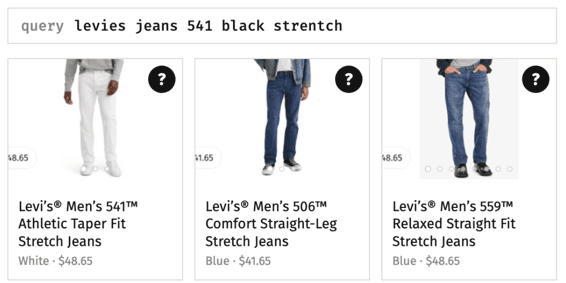
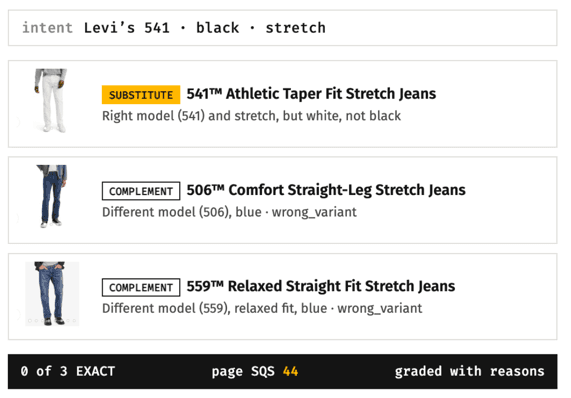
With IQ Score, the judge reads the intent despite the typos — Levi's, model 541, black, stretch — and grades every result with a reason. A white 541 is
graded SUBSTITUTE: right model, wrong color. A blue 506 and a blue 559 are graded COMPLEMENT with the failure bucket wrong variant. None of the results
is an exact match, and the page score of 44 says so.
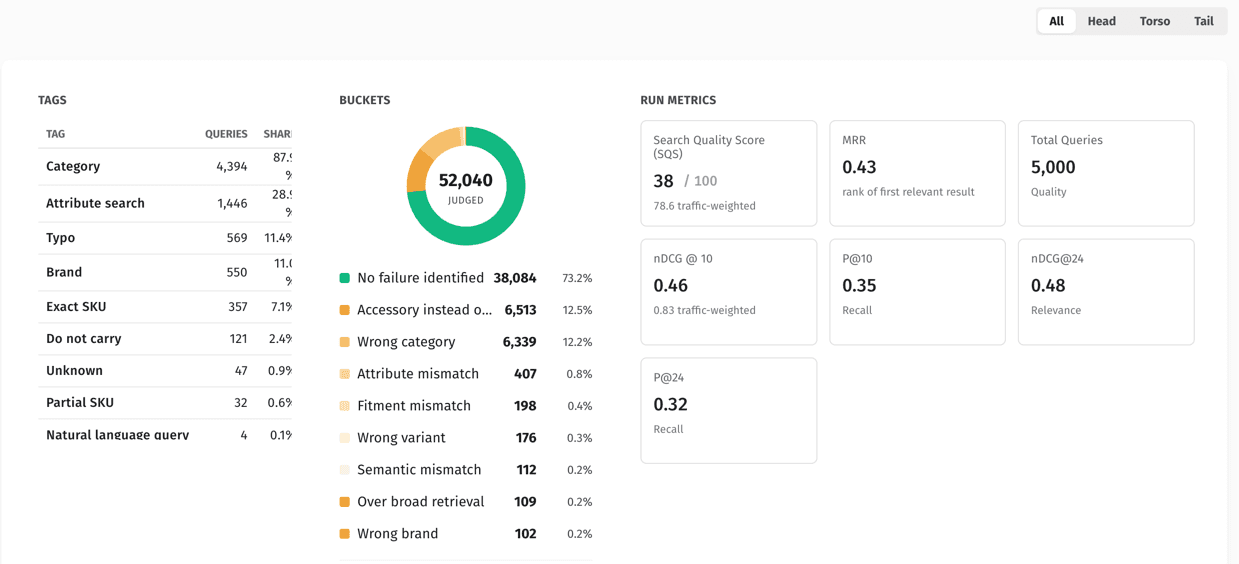
Query tags — every query is also tagged by the kind of query it is: a category (brake pads), an attribute search, a brand, an exact SKU or part number, a typo, or do not carry — a product the retailer does not sell. Tags matter because the fix differs for each kind: weak exact-SKU results point at identifier matching, weak typo results at spelling tolerance, and a low score on do not carry queries is an assortment gap rather than a search problem. Every metric can be filtered by tag.
Golden data set — approved query → product → grade labels that act as ground truth. Before anything is sent to the judge, IQ Score looks the pair up in
the golden data set; if it already has an approved grade, that grade is used and no LLM call is made. The golden data set is therefore also the main cost
control: as it grows, each run needs less judging. A tenant can keep several golden data sets and choose one per run.
Golden candidates — newly judged pairs waiting for review. The Search Team approves them into a golden data set, or corrects the grade first, so an unreviewed judge grade never silently becomes ground truth. Labels can also be bootstrapped from shopper engagement (product views, add-to-cart, purchases) or uploaded in bulk.
Search Quality Score (SQS) — a single 0–100 number: how close the judged results came to the best possible grade. It is the headline figure, reported both as a plain average and traffic-weighted.
Ranking metrics — computed at three cut-offs over the first result page: @4 (top row), @10 (first screen) and @24 (full first page).
| Metric | What it answers |
|---|---|
| nDCG@k | Are the most relevant products ranked near the top? |
| P@k | Of the top k products, what fraction are relevant? |
| MRR | How high does the first relevant product appear, on average? |
| MAP | How consistently do relevant products appear across the results? |
| SQS | Across the whole page, how relevant were the results, from 0–100? |
How it works
- Start a run. Request a run on demand, or let a scheduled baseline run on its own. Choose the query set, the search service to evaluate and, optionally, the golden data set to score against.
- Results are retrieved. For each query, IQ Score calls the search service and normalizes the first page of results into a common shape, so every search engine is scored the same way.
- Every result is graded. Pairs already in the golden data set take their approved grade. The rest go to the judgement agent, which researches where it needs to and returns a grade, confidence, failure bucket and reasoning.
- Metrics are calculated. Grades are turned into nDCG, precision, MAP, MRR and SQS per query, then rolled up to the run. This step is plain arithmetic with no LLM, so it is fast and exactly reproducible.
- Review and act. Read the run summary, filter by segment or query tag, drill into the worst queries and the reasoning behind each grade, compare against an earlier run, and approve good judgments into the golden data set.
Comparing runs
A comparison is two runs over the same queries. Holding the query set fixed is what makes the comparison honest: when a metric moves, relevance moved, not the traffic mix. The comparison report puts both runs side by side with a headline finding, a win tally, the queries where the two runs diverge most, a breakdown by query segment, the SQS distribution and the top-traffic queries. Reports can be viewed in the browser or exported as HTML, CSV or JSON.
A run can also grade a captured snapshot of search results instead of live search, so results can be re-graded later regardless of what the live engine returns that day.
Reading the results
The cut-offs, grades and tags are diagnostic, not just scores:
- A strong
@4that falls away by@24means a good top row over weak depth. A weak@4that rises by@24means relevant products are there but buried. - A page full of
COMPLEMENTresults means search understood the query but answered the wrong side of it — accessories for a product query. A page full ofIRRELEVANTresults means it did not understand the query at all. - The failure-bucket distribution across a run shows which problem is most common, which is usually the best place to start fixing.
- The query-tag breakdown shows which kind of query is weakest, and so which kind of fix to reach for.
Current scope: IQ Score grades individual products on the first result page (up to 24 results). Evaluating the ordering of categories in a response is not supported yet. When the judge finds a better product than the one returned, the run reports it as a lower grade — it does not insert that product into the results.
Quick example
An auto-parts retailer is deciding whether to replace its current search engine. The search team samples 5,000 real queries from clickstream — 1,000 head, 1,000 torso and 3,000 tail — and runs IQ Score against both the current search and the candidate, with the same judge.
The summary answers the headline question in one number: the candidate scores an SQS of about 71 against about 40 for the current search. The segment breakdown shows where the gap comes from. Head queries are close, but tail queries differ sharply, and the current search returns no results at all for more than 2,000 of the 5,000 queries.
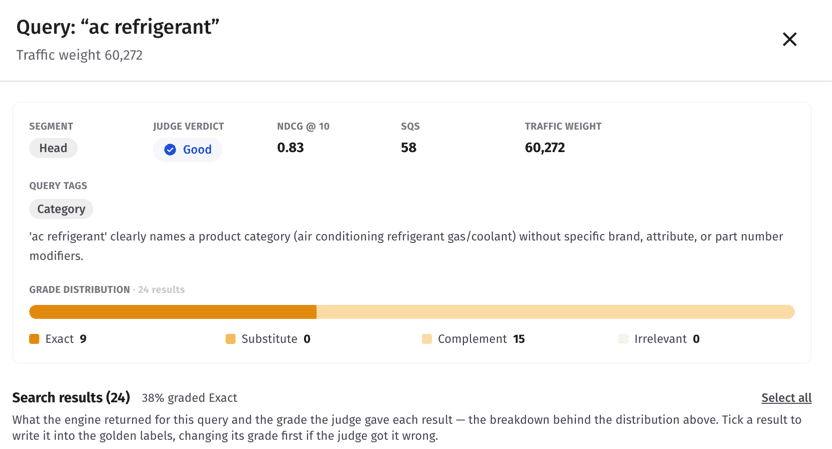
The team then opens single queries to see what sits behind each score. ac refrigerant is a head query with about 60,000 searches, tagged Category with
the judge's explanation of why. Its grade distribution shows 9 of the 24 results as EXACT and the other 15 as COMPLEMENT — products that go with
refrigerant rather than refrigerant itself — for an SQS of 58 and a verdict of Good. Below the summary, every result is listed with its grade and the
judge's reasoning, and the team can tick a result to write it into the golden labels, changing its grade first if the judge got it wrong.
The team now has a baseline, a list of specific queries to fix, and a fixed query set to re-run after every change. They approve the high-confidence judgments into a golden data set, so the next run over the same queries reuses those grades instead of judging every pair again.
For how the pipeline works under the hood, see the IQ Score Flow architecture page.
Related pages
- Evaluation — reproduce a single query in a sandbox to see exactly which rules and linguistics shaped the results
- Experiment Metrics — measure a change on real shopper behavior once it has passed offline evaluation
- Metrics — live search KPIs that point at the queries worth evaluating
- Glossary — definitions for the grades, metrics and terms used here