Lexical Mining
AI-discovered synonyms and misspelling corrections, mined from real search behavior and surfaced for human review
Every catalog has a vocabulary gap: shoppers type "breaks" when they mean "brakes", "freno" when they mean "brake", or "airbag" when the catalog says "air bag". Each of these mismatches is a search that returns the wrong products — or nothing at all. Lexical Mining finds these gaps automatically by analyzing what shoppers search versus what they actually buy, then proposes the exact synonym and spelling rules that would fix them. Nothing goes live on its own: every suggestion arrives as a reviewable candidate with the evidence behind it.
What it solves
Building linguistic rules by hand doesn't scale. A merchandiser can only add the synonyms and spelling corrections they happen to think of, and the long tail of real shopper vocabulary — regional terms, abbreviations, typos, foreign-language equivalents — is effectively invisible until someone notices a complaint or a drop in conversion.
Lexical Mining closes that gap. It continuously scans search analytics for underperforming terms, uses an AI agent to work out what shoppers actually meant, validates each proposed fix against the live search engine, and presents the strongest candidates for approval. The result is a steady stream of high-value linguistic rules that would otherwise never be discovered — each one backed by data rather than guesswork.
When to use it
- Recover failing searches — find the queries that return zero or poor results because of a spelling variant or an unrecognized synonym
- Grow your synonym coverage — surface domain, regional, and foreign-language equivalents ("freno" → "brake", "pastillas" → "brake pads") that shoppers use but the catalog doesn't
- Catch common misspellings — identify high-traffic typos ("breaks" → "brakes", "fiter" → "filter") and route them to the correct products
- Prioritize by impact — focus review effort on the candidates that affect the most traffic and recover the most lost purchases
- Feed the review queue continuously — let the pipeline run on a schedule so new vocabulary gaps are proposed as shopper behavior changes
Key concepts
Candidate — a single proposed linguistic rule. Each candidate maps one or more source terms (what shoppers type) to one or more target terms (what they meant), and carries the evidence and scores the pipeline gathered while evaluating it.
Candidate type — the kind of rule being proposed:
| Type | Meaning | Example |
|---|---|---|
| Two-way synonym | The terms are fully equivalent; a search for either should return both | "freno" ↔ "brake" |
| One-way synonym | The source term should also match the target, but not the reverse | "pastillas" → "brake pads" |
| Misspelling replacement | The source is a misspelling and should be rewritten to the correct term | "breaks" → "brakes" |
| Misspelling synonym | The source is a variant that should be treated as equivalent rather than replaced outright | "airbag" → "air bag" |
Validation status — the outcome of the pipeline's automated check, run against the live search engine before a human ever sees the candidate:
- Passed — the proposed change improves results and is ready for review
- Needs review — the change looks promising but the evidence is mixed; a human decision matters most here
- Failed — the change did not improve results (for example, the search engine already returns identical results for both terms, making the rule redundant)
Confidence — how strongly the pipeline believes the proposed rule is correct, shown as a percentage.
Impact — the estimated reach of the change (Low, Medium, High, or Critical), based on how much traffic the source term draws and how many sessions the rule would affect. Use it to prioritize which candidates to review first.
Traffic (30d) — the recent search volume associated with the candidate, giving a quick sense of how many shoppers a rule would touch.
How it works
Lexical Mining runs as an automated pipeline that produces candidates, and a review workspace in the Merch Module UI where merchandisers decide which ones to apply. For the full pipeline internals, see the Lexical Mining Flow architecture page.
Review the candidate list
The Lexical Mining page lists every mined candidate, newest and strongest first. Each row shows the term pair, its type, the product category it relates to, confidence, impact, and recent traffic.
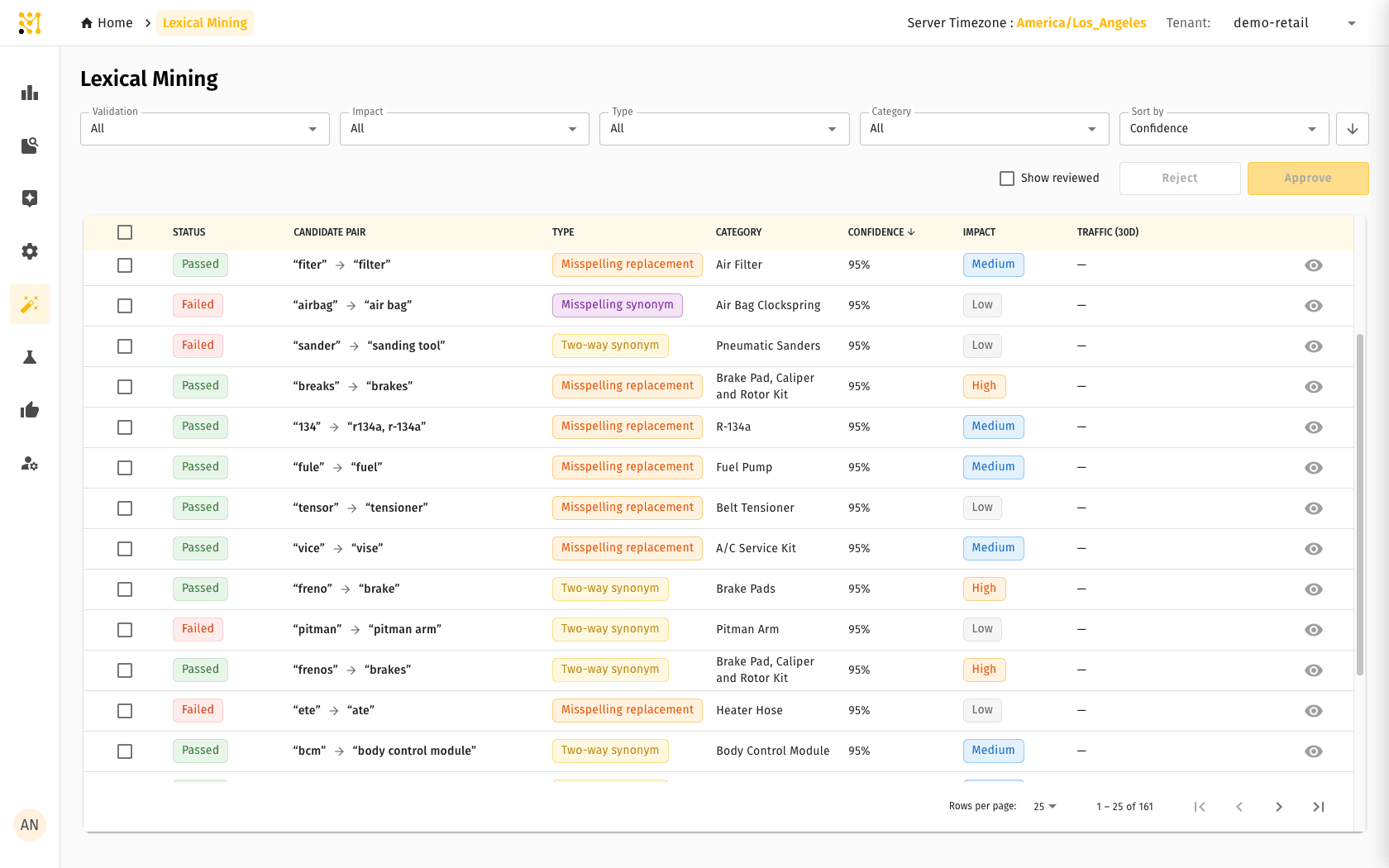
Use the filters at the top to narrow the queue by Validation status, Impact, Type, or Category, and Sort by confidence, traffic, or recovered purchases. The Show reviewed toggle brings already-decided candidates back into view.
Inspect a candidate
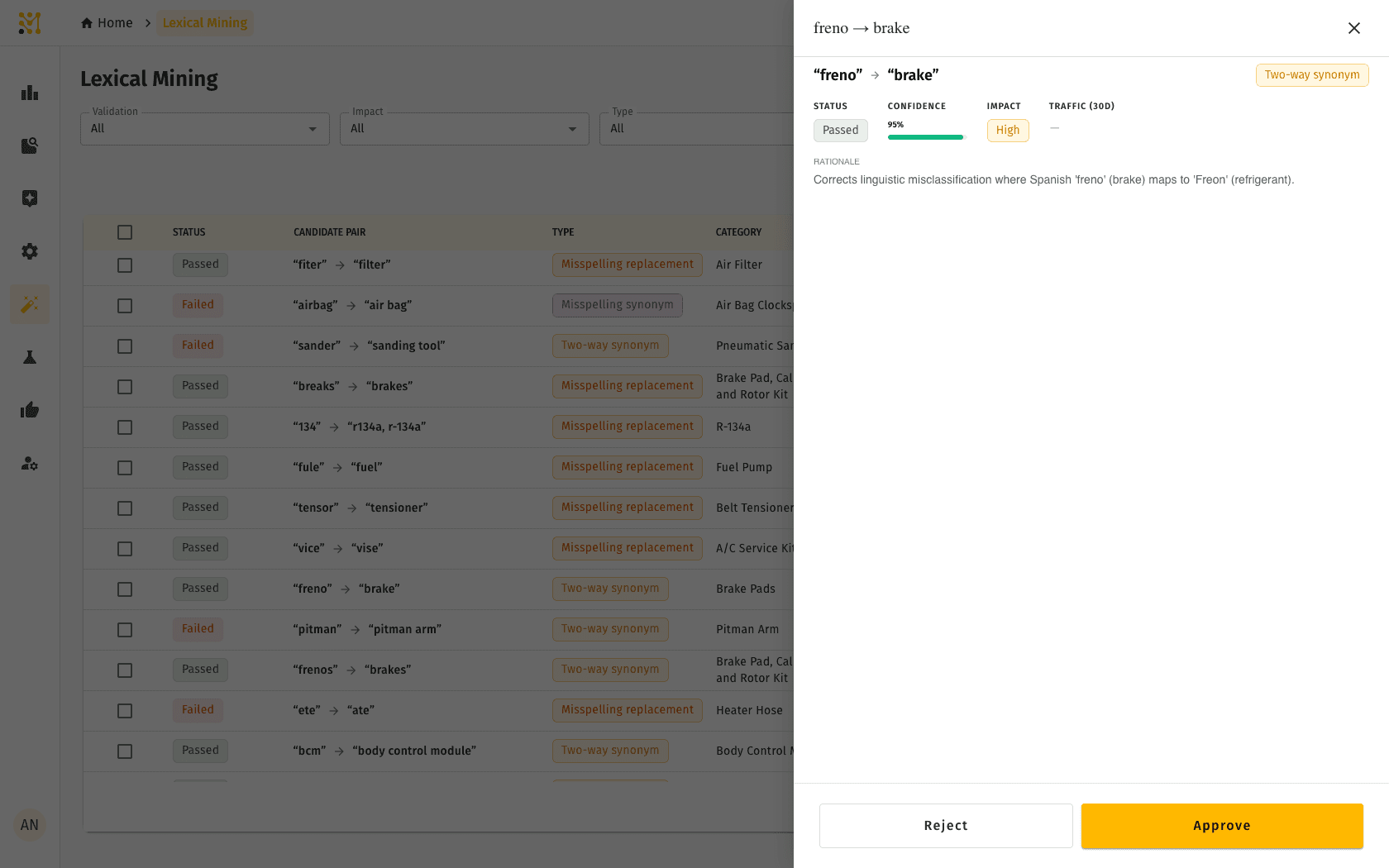
Selecting a candidate opens a detail panel with its full evidence. Alongside the status, confidence, impact, and traffic, the panel explains the pipeline's Rationale — why it believes the rule is correct.
Where the data is available, the panel also shows the Top Queries for both the source and target terms side by side, with their volumes. This makes it easy to confirm that shoppers really do use both terms — and to see when a proposed rule is unnecessary because the engine already handles it.
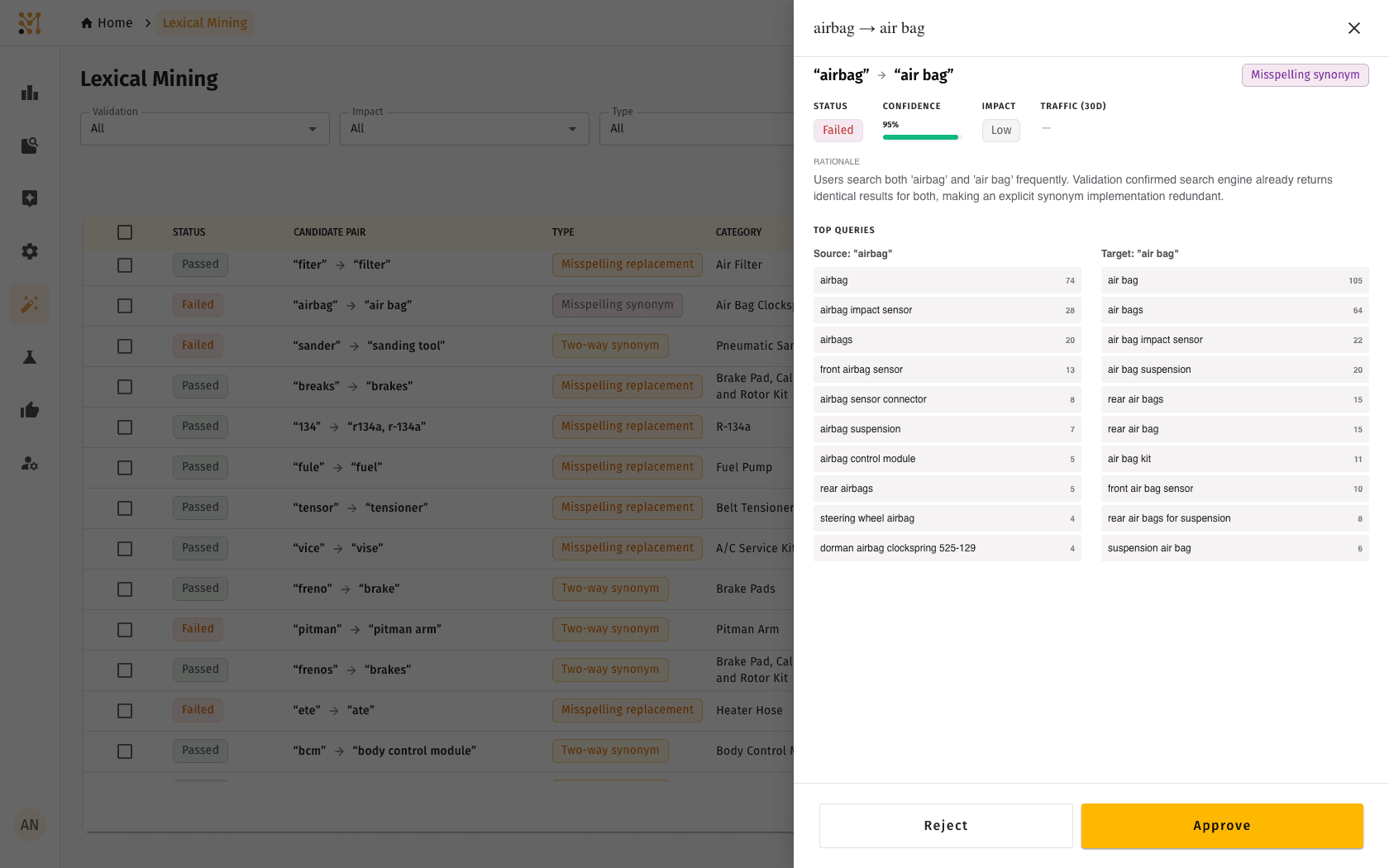
Some older candidates were mined before the Top Queries evidence was captured and will not show that section. Newer pipeline runs populate it for every candidate.
Approve or reject
From the detail panel — or by selecting multiple rows and using the bulk Approve / Reject actions — a reviewer records a decision:
- Approve turns the candidate into a live Linguistic Override: a two-way synonym, one-way synonym, or spelling replacement, depending on the candidate type. Once created, the rule takes effect through the Query Understanding Service and starts shaping search results.
- Reject dismisses the candidate and keeps a record of who decided and why.
Because approval creates a standard linguistic override, an approved rule behaves exactly like one a merchandiser wrote by hand — and can be viewed, edited, or removed from the Linguistic Overrides page afterward.
Access to Lexical Mining is controlled per tenant. The feature must be enabled for the tenant, and reviewers need the same permissions used for Linguistic Overrides — view access to browse candidates, and create access to approve or reject them.
Quick example
An auto-parts retailer notices that searches for "freno" — Spanish for "brake" — return refrigerant products, because the engine confuses it with "Freon". No one has time to hunt for every mismatch like this.
Lexical Mining surfaces it automatically. The pipeline flags "freno" as an underperforming term, works out from purchase behavior that shoppers who search it go on to buy brake parts, validates that adding a "freno" ↔ "brake" synonym returns the right products, and presents the candidate as Passed with High impact and a clear rationale. A merchandiser reads the one-line explanation, clicks Approve, and the synonym is live for every shopper within moments — no re-indexing, no manual rule authoring, and no guesswork about whether it was worth doing.
Lexical Mining is part of the full MXP platform and is not available in Lightweight mode.
Related pages
- Lexical Mining Flow — how the analytics-and-agent pipeline discovers, validates, and scores candidates
- Lexical Mining Onboarding — how to provision the pipeline and enable the feature for a tenant
- Linguistic Override — the synonym, stop-word, and compound rules an approved candidate becomes
- Metrics — the search and browse analytics the pipeline mines