Linguistic Override
Custom synonyms, stop words, and compound-word rules for tenant-specific vocabularies
What it solves
Generic NLP models are trained on broad language data — not your specific domain. A footwear retailer's shoppers say "tennies" when they mean "tennis shoes." An automotive parts catalog uses "OEM" in a way that's meaningless to a general-purpose search engine. A grocery platform needs "semi-skimmed" and "2% milk" to be understood as the same thing.
Out of the box, these domain-specific relationships are invisible to the search engine. Linguistic overrides make them explicit — so shoppers using your vocabulary find products described in your suppliers' vocabulary, and vice versa.
When to use it
- Domain-specific synonyms — map industry jargon, regional terms, or brand-specific language to the terms used in product data
- Stop words — suppress terms that add noise to queries in your specific context (a parts catalog might want to suppress "part" as a stop word since every product is a part)
- Compound word handling — define how compound terms are split or joined for matching (e.g., "t-shirt" matching "tshirt" and "t shirt")
- Abbreviation expansion — ensure abbreviations common in your category expand correctly ("XL" → "extra large", "OEM" → appropriate category-specific behavior)
- New product launches — add vocabulary for new categories or product lines before organic query data builds up
Key concepts
Synonym rules — define equivalence relationships between terms. A one-way synonym ("tennies" → "tennis shoes") expands the query without adding the reverse. A two-way synonym makes both terms equivalent in both directions.
Stop words — terms the query understanding system ignores when parsing queries. Useful for removing noise words that are specific to your domain context.
Compound rules — define how multi-word terms or hyphenated terms are handled during tokenization. Ensures "t-shirt", "tshirt", and "t shirt" all match the same products.
Scope — linguistic overrides are tenant-scoped. Different tenants on the same MXP instance can have entirely different vocabulary rules without affecting each other.
How it works
Linguistic overrides feed directly into the Query Understanding Service (QUS), which processes every search query before it reaches the search engine. When a shopper submits a query, QUS applies the active linguistic rules for the tenant — expanding synonyms, removing stop words, and applying compound rules — before the query is executed against the index.
This means linguistic overrides affect all search surfaces simultaneously: text search, autocomplete, and browse. They're configured in the Merch Module UI under Linguistic Overrides and take effect immediately on save.
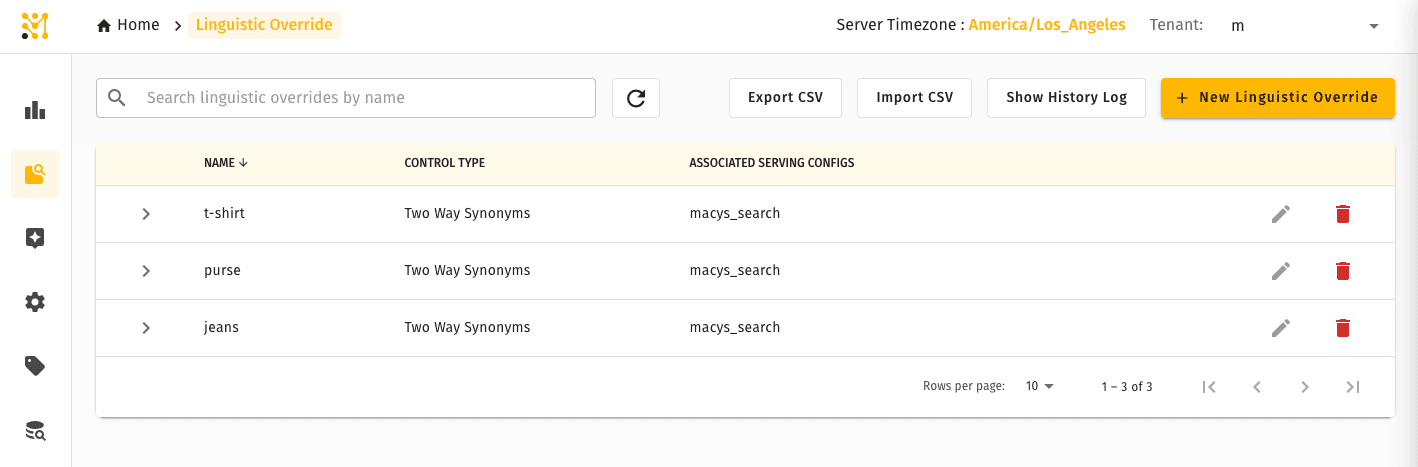
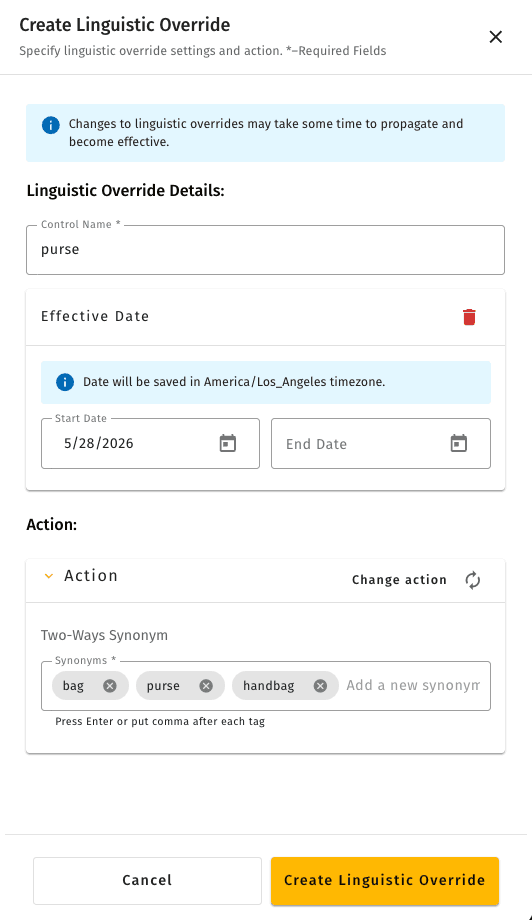
Use + New to define a new override. The editor lets you pick the override type (one-way synonym, two-way synonym, stop word, or compound rule) and enter the terms.
Quick example
A specialty outdoor retailer notices that queries for "softshell" return poor results because their supplier data uses "soft shell" (two words) inconsistently. Shoppers searching "softshell jacket" miss half the relevant products.
A tenant administrator adds a compound rule making "softshell" and "soft shell" equivalent. From that point, both forms match the same products — no re-indexing required, no product data changes needed. The fix takes two minutes and affects every search surface immediately.
Linguistic overrides are available in Lightweight mode with two additions that tie them to serving configurations — see what differs.