Evaluation
Search sandbox for testing ranked results, rules, and linguistic configuration in MXP
What it solves
Metrics show you that something is wrong — a low view rate, a zero-result spike, a conversion drop on a specific query. But they don't show you why. Evaluation is a search sandbox where you can reproduce exactly what a shopper sees: the ranked result list, the facet panel, and the underlying rules, linguistics, and global settings that produced them.
It bridges the gap between observing a problem in Metrics and understanding what's causing it — before you make a change that might fix it or make it worse.
When to use it
- Diagnosing a low-converting query — reproduce the exact ranked output a shopper would see and inspect which rules and linguistic processing shaped it
- Verifying a rule before activating it — test the effect of a boost, bury, or filter rule in a safe sandbox before it goes live
- Debugging a linguistic override — confirm that a synonym or stop word rule is being applied as expected
- Comparing two configurations — run the same query against two environments side by side to compare ranking before and after a change
Key concepts
Query evaluation — enter any search query and see ranked results exactly as a shopper would, with the full facet panel on the left.
Rules tab — shows which discovery rules fired for the query, what they matched, and how they affected ranking. If a product is appearing higher or lower than expected, this is where to look first.
Linguistics tab — shows how the query was interpreted after linguistic processing: which synonyms expanded, which stop words were dropped, and how the query was tokenized before being sent to the search engine.
Global tab — shows the tenant-wide settings in effect: facet configuration, sort defaults, and other global parameters that influenced the result set.
Add Environment — opens a side-by-side view for comparing the same query against two different environments or configurations. Useful for validating a configuration change before promoting it to production.
How it works
Open Evaluation from the left sidebar (person icon). Type a query in the search bar. The main panel shows ranked products exactly as a shopper would see them, with the facet panel on the left.
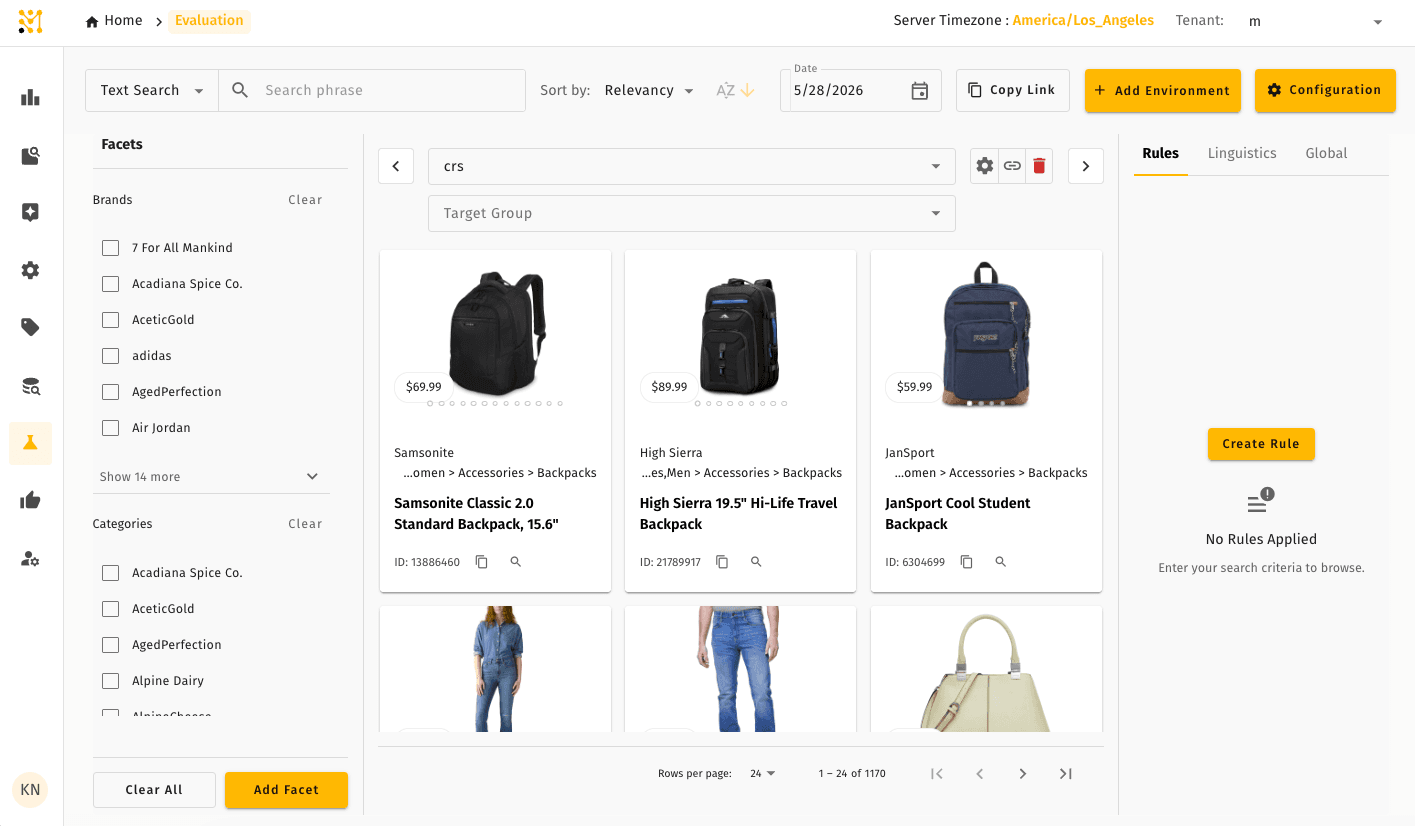
The right panel has three tabs:
- Rules — lists every discovery rule that was evaluated for the query, which ones matched, and the score modifier applied
- Linguistics — shows query interpretation: the original query, expanded synonyms, applied stop words, and the final tokenized form sent to the search engine
- Global — shows tenant-wide settings active for this query
To compare two configurations, click Add Environment to split the view. Both sides update in sync as you type.
Evaluation always reflects the currently active configuration — published rules, active linguistic overrides, and current global settings. Draft or inactive rules do not appear.
Quick example
A search operator sees in Metrics that the query "running shoes women" has a 0% view rate. They open Evaluation and type the query. The main panel shows zero results. The Linguistics tab reveals the stop word "women" is being suppressed, leaving the search engine to match only on "running shoes" with a category filter that has no products. They remove the stop word rule from Linguistic Overrides and re-test — results appear as expected.
Evaluation is available in Lightweight mode in reduced form, with an added recommendation testing workflow — see what differs.
Related pages
- Metrics — start here to identify which queries need investigation
- Lightweight Mode — how Evaluation differs in a Lightweight deployment
- Discovery Rules — create and test rules you'll verify in the Rules tab
- Linguistic Override — test synonym and stop word effects in the Linguistics tab
- Daily workflows — how Evaluation fits into a typical merchandiser's morning routine
Experiment Metrics
Compare two versions of search or browse on real shopper behavior — sessions, conversion, revenue and the queries that drove the change.
IQ Score
Measure search relevance offline with an LLM judge — a repeatable 0–100 score, ranking metrics, and a graded, explained verdict for every result