Visual Navigation Suggestions
Image-driven navigation suggestions for product discovery
What it solves
Text-only autocomplete works well for shoppers who know exactly what they want to type. But many shoppers browse visually — they're looking for inspiration or exploring a category, not formulating a precise query. Visual Navigation Suggestions extend the search experience with image-driven suggestions that guide shoppers toward categories and products they might not have thought to search for directly.
When to use it
- Category-led browsing experiences — surface visual category tiles alongside text suggestions to catch shoppers who are browsing, not searching
- Promotional surfaces — highlight specific categories or product sets with imagery during campaigns
- Reducing zero-result searches — guide shoppers toward well-served categories before they type a query that returns nothing
Key concepts
Visual suggestion — a combination of an image, a label, and a destination (usually a category or search query) that appears in the suggestion panel as a shopper types or focuses the search bar.
Trigger — the query prefix or context that causes a visual suggestion to appear. A suggestion can be configured to appear for specific query prefixes or as a default set when the search bar is first focused.
Destination — where the shopper lands when they click a visual suggestion. This can be a category page, a pre-filtered search results page, or any URL in the storefront.
How it works
Open Product Discovery → Visual Navigation from the left sidebar. Each row represents a configured visual suggestion, showing the image, label, trigger, and destination.
To add a new suggestion, click + New and configure the image, label, trigger, and destination. Suggestions can be ordered manually to control which appears first when multiple suggestions match the same trigger.
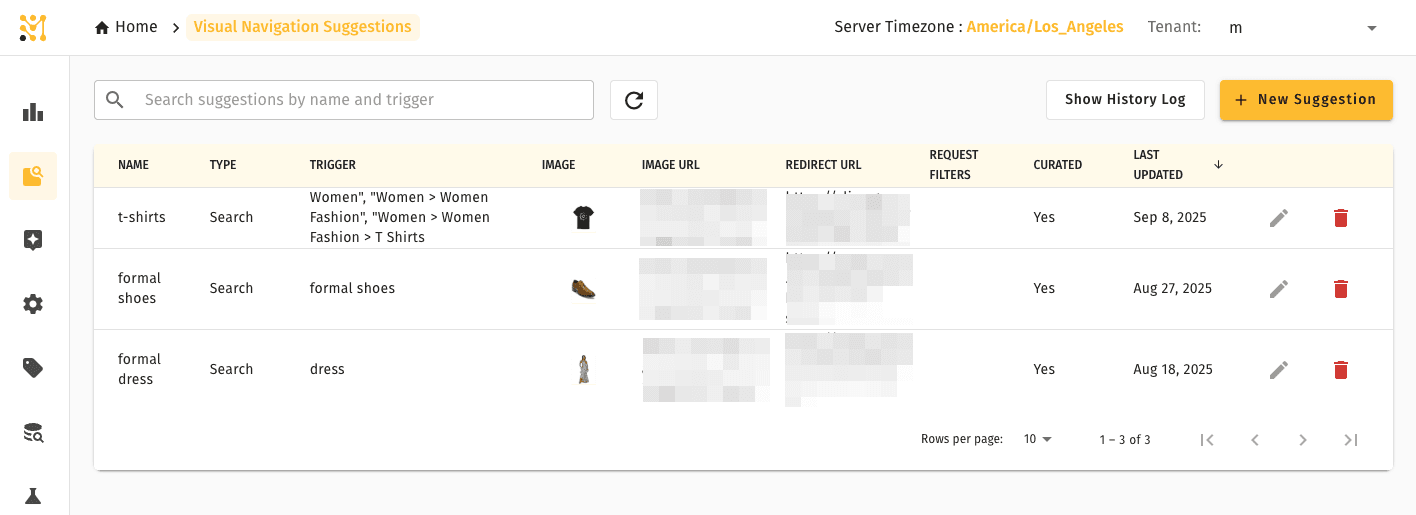
Visual Navigation Suggestions is part of the full MXP platform and is not available in Lightweight mode.
Related pages
- Autocomplete — text-based query suggestions that appear alongside visual navigation
- Product Discovery — overview of all discovery tools