Recommendation Rules
Business rules for filtering and boosting recommendation results
What it solves
ML recommendation models optimize for behavioral signals — clicks, purchases, views. But business intent doesn't always align with engagement patterns. A bestselling product that's out of stock shouldn't appear in recommendations. A new product line needs visibility before it has the engagement data to rank well. Brand restrictions may prevent certain products from appearing alongside others.
Recommendation Rules give merchants control over recommendation outputs without retraining models — the same boost, bury, and filter logic that applies to search results, applied to recommendation surfaces.
When to use it
- Filtering out-of-stock products — prevent unavailable products from appearing in recommendations
- Promoting new arrivals — boost products that have no engagement history yet
- Enforcing brand or category restrictions — filter products that shouldn't appear in specific recommendation contexts
- Running time-limited promotions — pin or boost specific products for a campaign window, then deactivate when the campaign ends
Key concepts
Boost — increase the likelihood that matching products appear in recommendations.
Bury — decrease the likelihood of matching products appearing. Useful for deprioritizing products that are technically available but not ideal for a given surface.
Filter — remove products from recommendations entirely. Use for hard constraints like out-of-stock exclusions or brand restrictions.
Rule scope — recommendation rules can be scoped to a specific recommendation container (page type) or applied globally across all recommendation surfaces.
Effective dates — rules support optional start and end dates, so time-limited promotions deactivate automatically without manual cleanup.
How it works
Open Recommendations → Recommendation Rules from the left sidebar. The list shows each rule's name, what it matches, its effective date range, and whether it's currently active.
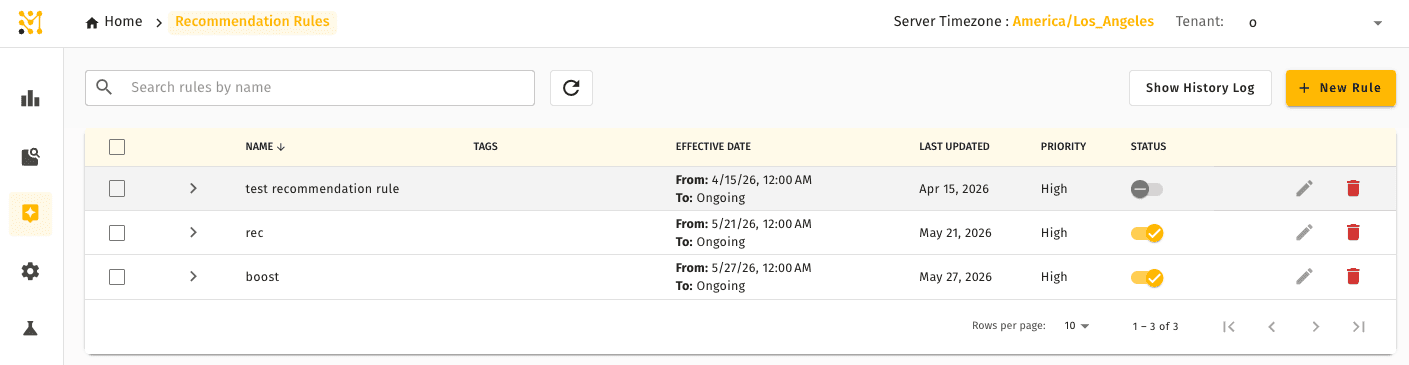
Rules work like Discovery Rules in structure: create a rule, define the condition (product attribute, category, or product set), select the action (boost, bury, or filter), and set an optional date range. Rules take effect immediately on activation.
To create a new rule, click + New Rule and configure the condition and action. Set a date range if the rule is time-limited.
Quick example
A merchandiser wants to prevent out-of-stock products from appearing in any recommendations. They create a Filter rule with the condition in_stock = false and no end date. All recommendation containers now automatically exclude unavailable products without requiring changes to individual models.
Recommendation Rules are available in Lightweight mode with a reduced set of triggers and actions — see what differs.
Related pages
- Recommendation Models — the models whose output these rules modify
- Lightweight Mode — how recommendation rules differ in a Lightweight deployment
- Recommendation Containers — where rules are applied by page placement
- Discovery Rules — the search equivalent, with the same rule structure